Your Phone Suddenly Loses Network… Then Your Money Starts Disappearing
It’s 7:30 PM on a Tuesday.
You’ve just finished dinner when you glance at your phone. Instead of seeing your mobile network, the screen displays “Emergency Calls Only.”
You shrug it off.
“MTN is probably having network issues,” you think.
Five minutes later, you try making a call.
Nothing.
Ten minutes later, your banking app logs you out.
Then the panic begins.
Your email receives notifications that your password has been reset.
A few minutes later, debit alerts begin arriving…
₦250,000.
₦500,000.
₦1,200,000.
By the time you regain control of your phone number, your account has already been emptied.
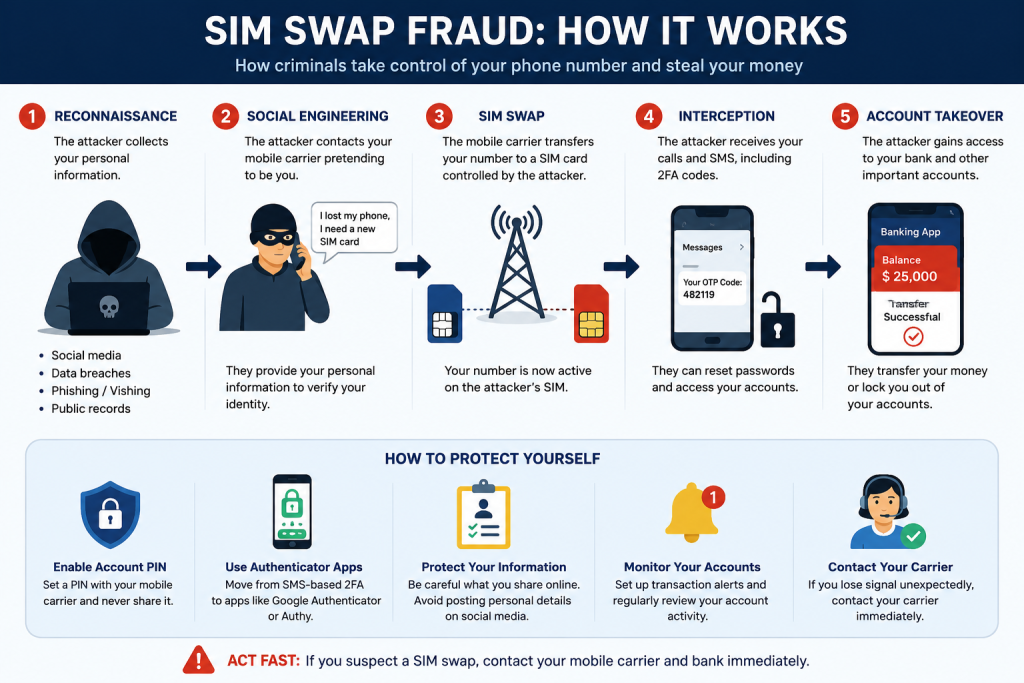
Unfortunately, this scenario reflects a pattern seen in many SIM-swap fraud cases. Criminals don’t always need your phone—they often need enough personal information to convince a mobile provider to transfer your number to a new SIM under their control.
What Is SIM-Swap Fraud?
SIM-swap fraud happens when criminals convince a mobile network provider to transfer your phone number to a SIM card they control.
Once they receive your calls and SMS messages, they may be able to intercept one-time passwords (OTPs), password reset codes, and account verification messages used by banks and online services.
If an account relies primarily on SMS verification, this can significantly increase the risk of unauthorized access.
The Reconnaissance Phase: The Part Most People Never See
The SIM swap itself is usually the final stage of the attack.
Before that, criminals often spend days or weeks collecting information about a potential victim.
They may look for details such as:
- Full name
- Date of birth
- Phone number
- Email address
- Home address
- Mother’s maiden name (if used for verification)
- Bank name
- Social media information
This information may come from phishing messages, data breaches, fake forms, or publicly shared details—not necessarily from hacking the victim’s phone.
The more personal information criminals have, the easier it may be for them to impersonate someone during customer service interactions.
Why Your Phone Number Is So Valuable
Your phone number is connected to many important services, including:
- Bank accounts
- Email accounts
- Social media
- Mobile wallets
- Government services
- Two-factor authentication
Control of a phone number can make it easier for criminals to attempt account recovery or password resets.
Warning Signs of a Possible SIM-Swap
Be alert if you notice:
- Your phone suddenly loses network service without explanation.
- You stop receiving calls or text messages.
- Unexpected password reset notifications arrive.
- You receive banking alerts for transactions you didn’t make.
- Your banking or email apps unexpectedly log you out.
If these happen, contact your mobile network provider and your bank immediately using official customer service channels.
How to Protect Yourself
1. Add Extra Security to Your Mobile Account
Ask your mobile network provider whether you can enable additional account protection, such as an account PIN or other identity verification measures for SIM replacement requests.
This is different from the SIM PIN used to unlock your phone.
2. Strengthen Your Banking Security
Where supported by your bank, consider using stronger authentication methods in addition to or instead of SMS-based verification, such as authenticator apps or secure in-app approval features.
Check your bank’s official guidance before making changes.
3. Protect Your Personal Information
Avoid sharing sensitive personal details publicly, including:
- Date of birth
- Home address
- Identification numbers
- Answers to common security questions
The less information available, the harder it is for criminals to impersonate you.
4. Be Careful with Phishing
Never click suspicious links asking you to:
- Verify your bank account
- Upgrade your SIM
- Claim a prize
- Update your BVN
- Confirm your ATM card
Always verify requests through official websites or customer service numbers.
5. Monitor Your Accounts
Regularly review:
- Bank transactions
- Email login activity
- Mobile network notifications
- Password reset emails
Early detection can reduce the impact of fraud.
What to Do If You Suspect a SIM Swap
If you believe your SIM has been fraudulently transferred:
- Contact your mobile network provider immediately using an official support number.
- Notify your bank and request that affected accounts be secured.
- Change passwords for your email and important online accounts from a trusted device.
- Review recent account activity and report any unauthorized transactions.
- Monitor your accounts closely over the following days.
Final Thoughts
SIM-swap fraud continues to evolve, but awareness remains one of the strongest defenses. Criminals often succeed because they exploit personal information and trust—not because they have advanced hacking tools.
Protecting your mobile account, limiting the personal information you share, and using stronger authentication methods where available can greatly reduce your risk.
Cybersecurity starts with simple habits, and your phone number is one of your most valuable digital assets.
Frequently Asked Questions (FAQ)
Can someone steal my money with just my phone number?
A phone number alone is generally not enough. However, if attackers combine it with other personal information or compromised account credentials, it can become part of a broader fraud attempt.
Does losing network service always mean a SIM swap?
No. Network outages happen for many reasons. However, if the outage is unexpected and accompanied by unusual account activity, contact your provider promptly.
Should I stop using SMS authentication completely?
SMS authentication is generally better than having no two-factor authentication at all. Where available, phishing-resistant authentication methods or authenticator apps may provide stronger protection.
ABOUT THE AUTHOR
Jackson Godwin is a Cybersecurity Analyst and Penetration Tester at Jackson Technology, a cybersecurity and data protection consulting firm based in Abuja, Nigeria, serving enterprise clients across banking, fintech, oil and gas, and the public sector. His expertise spans vulnerability assessment and penetration testing (VAPT), cloud security, and compliance advisory covering ISO 27001, the NDPA 2023, and GDPR. He is also affiliated with TechTrain Academy, where he supports cybersecurity education for African professionals.
info@jacksontechnology.com.ng | jacksontechnology.com.ng