



By Jackson Godwin. Cybersecurity Analyst & Penetration Tester.
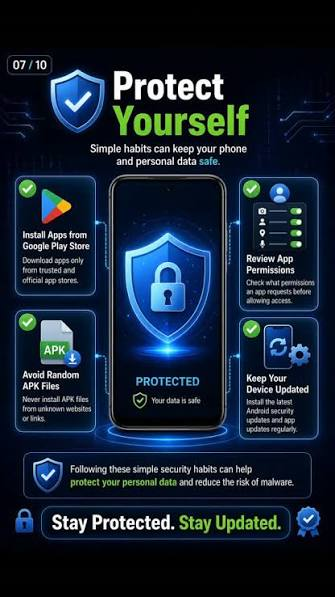
Both Google Play and the Apple App Store review applications before they are published and regularly remove apps that violate their policies.
However, on rare occasions, deceptive or malicious apps have temporarily appeared before being detected and removed. This is why it’s important not to rely solely on the fact that an app is available in an official store.
Always verify that you’re downloading the correct application.
Warning Signs
Be cautious if you notice:
- Very few downloads for a well-known bank.
- Poor grammar or spelling mistakes in the app description.
- Low-quality screenshots.
- Many recent negative reviews mention issues with fraud or login.
- An unfamiliar developer name.
- Requests for unnecessary permissions.
If anything feels suspicious, stop and verify the app before installing it.
How to Verify a Banking App
Before downloading:
Check the Developer
Confirm that the developer name matches your bank’s official organization.
Visit Your Bank’s Website
Use your bank’s official website to follow the official download link instead of searching manually.
Read Recent Reviews
Look for consistent reports of suspicious behavior.
Check the Number of Downloads
Official banking apps from major banks typically have a large number of downloads and an established history.
How to Protect Yourself
Follow these best practices:
- Download banking apps only from official app stores or links provided on your bank’s official website.
- Keep your phone’s operating system updated.
- Enable multi-factor authentication where available.
- Never share your banking password or one-time verification codes.
- Be cautious of messages urging immediate action.
- Review app permissions before granting access.
- Remove apps you no longer use.
What to Do If You Installed a Fake App
If you suspect you’ve installed a fraudulent banking app:
- Disconnect the device from the internet if possible.
- Contact your bank immediately.
- Change your online banking password using a trusted device.
- Remove the suspicious application.
- Run a reputable mobile security scan if appropriate for your device.
- Monitor your account for unauthorized transactions.
- Report the app through the official app store.
Quick action can help reduce the impact of compromised credentials.
Common Myths
Myth: Every app in an official app store is automatically safe.
Reality: Official app stores have strong review processes, but users should still verify the developer and app details.
Myth: Apple devices cannot be targeted.
Reality: iPhones have robust security features, but phishing, social engineering, and fraudulent apps can still target users.
Myth: Antivirus alone will stop all mobile banking threats.
Reality: Safe user behavior, official downloads, software updates, and strong authentication are all important layers of protection.
Final Thoughts
Mobile banking has made managing finances faster and more convenient, but it has also become an attractive target for cybercriminals.
The best defense is to download apps only from trusted sources, verify the developer, ignore suspicious messages, and stay alert for signs of fraud.
A few minutes spent verifying an app can help protect your identity, your finances, and your peace of mind.
Frequently Asked Questions (FAQ)
Can fake banking apps appear on Google Play or the Apple App Store?
It’s uncommon, but deceptive apps have occasionally appeared before being removed. Both Google and Apple actively review apps and remove those that violate their policies, but users should still verify the developer and use official download links whenever possible.
How can I verify I’m downloading the official banking app?
The safest approach is to visit your bank’s official website and follow the app download link provided there. Also verify the developer name and review app details before installing.
What should I do if I entered my banking password into a fake app?
Contact your bank immediately, change your password from a trusted device, review your recent transactions, and report the fraudulent application to the relevant app store.
About the Author
Jackson Godwin is a Cybersecurity Consultant specializing in Vulnerability Assessment and Penetration Testing (VAPT), Governance, Risk and Compliance (GRC), Information Security, and Banking Cybersecurity. Through JacksonTechnology.com.ng, he publishes practical cybersecurity tutorials, fraud awareness guides, and compliance resources to help individuals and organizations stay protected against evolving cyber threats.
SEO URL Slug
/fake-mobile-banking-apps-how-to-avoid-clone-apps-2026
SEO Tip
This article has strong search potential because it targets a topic that affects millions of mobile banking users. To improve engagement, include screenshots (with permission) showing:
- How to verify an app’s developer.
- Where to find the official download link on a bank’s website.
- Examples of suspicious app permissions.
These visuals can increase time on page and make the guide easier for readers to follow.
– **Deepfake Voice Awareness:** Why you should never trust a “Bank Official” or “Relative” calling you on the phone.
Deepfake Voice Scams: Why You Should Never Trust a “Bank Official” or “Relative” Calling You (2026 Guide)
Meta Title: Deepfake Voice Scams: How AI Voice Cloning Is Used to Commit Fraud (2026)
Meta Description: Learn how deepfake voice scams work, how cybercriminals impersonate bank officials and family members, and practical steps to protect yourself from AI-powered fraud.
Focus Keyword: Deepfake Voice Scam
SEO Keywords: deepfake voice scam, AI voice cloning, bank phone scam, voice phishing, vishing, banking fraud, AI fraud, cybersecurity awareness
Deepfake Voice Scams: Why You Should Never Trust a “Bank Official” or “Relative” Calling You
Your phone rings.
The caller ID shows your bank’s name.
The person on the other end sounds calm and professional.
“Good afternoon. This is Michael from the Fraud Department. We’ve detected suspicious transactions on your account. To protect your money, please verify the six-digit code we just sent to your phone.”
Everything sounds genuine.
The voice is confident.
The caller knows your name.
They even know the bank you use.
Without realizing it, you read out the verification code.
Minutes later, your account is emptied.
In another case, your phone rings late at night.
You hear your daughter’s voice crying.
“Dad… I’ve been arrested. Please send money immediately. Don’t tell anyone.”
The voice sounds exactly like hers.
But it isn’t.
This is the frightening reality of deepfake voice scams, one of the fastest-growing forms of AI-enabled fraud.
What Is a Deepfake Voice Scam?
A deepfake voice scam utilizes artificial intelligence (AI) to generate a synthetic voice that closely mimics a real person’s speech.
Cybercriminals may clone the voices of:
- Family members
- Friends
- Company executives
- Bank employees
- Government officials
- Customer service representatives
The goal is to convince victims to transfer money, reveal confidential information, or approve fraudulent transactions.
How Do Criminals Clone a Voice?
Many people unknowingly share voice recordings online through:
- TikTok videos
- Instagram Reels
- YouTube videos
- Podcasts
- WhatsApp voice notes
- Facebook Live sessions
With enough publicly available audio, AI tools can generate speech that sounds remarkably similar to the original speaker.
The quality varies, and many scams still contain clues that something is wrong, but the technology continues to improve.
How the Scam Works
Step 1: Information Gathering
Fraudsters collect information from:
- Social media profiles
- Data breaches
- Public websites
- Leaked contact lists
Step 2: Voice Cloning
Using AI, they generate a voice that resembles the victim’s relative or a trusted authority.
Step 3: The Urgent Phone Call
The scammer creates panic.
Examples include:
- “Your account has been hacked.”
- “Your son has been kidnapped.”
- “Your daughter has been arrested.”
- “Your business account is under attack.”
The objective is to stop you from thinking clearly.
Step 4: The Demand
The scammer asks you to:
- Transfer money.
- Reveal an OTP (One-Time Password).
- Share banking credentials.
- Approve a transaction.
- Install remote access software.
Why These Scams Are Effective
Deepfake voice scams succeed because they exploit human emotions, not just technology.
Scammers often rely on:
- Fear
- Urgency
- Trust
- Authority
- Sympathy
When people believe a loved one is in danger, they may act before verifying the situation.
Warning Signs
Be cautious if the caller:
- Pressures you to act immediately.
- Asks you not to tell anyone.
- Requests OTPs or passwords.
- Demands payment through gift cards, cryptocurrency, or unfamiliar bank accounts.
- Refuses to let you call back using an official number.
- Becomes aggressive when questioned.
Remember: A legitimate bank will never ask you for your password, PIN, or one-time verification code over the phone.
How to Protect Yourself
Follow these best practices:
Never Trust Caller ID Alone
Phone numbers can sometimes be spoofed to appear as if they come from trusted organizations.
Verify Independently
If someone claims to be from your bank:
- Hang up.
- Call the official customer service number listed on your bank’s website or the back of your bank card.
Create a Family Safe Word
Agree on a private word or phrase with close family members.
If you receive an emergency call, ask for the safe word before taking action.
Think Before You Act
Scammers depend on panic.
Take a moment to verify the situation before sending money or sharing information.
Protect Your Personal Information
Limit the amount of personal information you publicly share online.
What Banks Are Doing
Financial institutions are strengthening defenses by:
- Monitoring unusual transactions.
- Using fraud detection systems.
- Applying behavioral analytics.
- Improving customer awareness campaigns.
- Enhancing authentication methods beyond voice alone.
Banks increasingly rely on multiple layers of verification rather than assuming a caller’s voice is enough to prove identity.
What to Do If You Receive a Suspicious Call
If you suspect a scam:
- End the call immediately.
- Contact your bank using its official phone number.
- Verify the relative’s safety using another trusted method.
- Do not share passwords or OTPs.
- Report the incident to your bank and the appropriate authorities if money or sensitive information was involved.
Final Thoughts
AI has brought remarkable innovations, but it has also provided criminals with new tools for deception.
A familiar voice is no longer proof of identity.
Whether the caller claims to be your bank, a government official, your employer, or a family member, always verify independently before sharing information or transferring money.
In today’s digital world, trust should be verified—not assumed.
Frequently Asked Questions (FAQ)
Can AI really clone someone’s voice?
Yes. Modern AI systems can generate speech that resembles a person’s voice using recordings, although the quality depends on the amount and quality of available audio.
Can banks identify customers by voice alone?
Some organizations use voice biometrics as one authentication factor, but many combine it with additional security measures because no single method is completely reliable.
What should I do if someone claiming to be my bank asks for an OTP?
Do not share it. End the call and contact your bank directly using the official phone number from its website or your bank card.
About the Author
Jackson Godwin is a Cybersecurity Consultant specializing in Vulnerability Assessment and Penetration Testing (VAPT), Governance, Risk and Compliance (GRC), Information Security, and Banking Cybersecurity. Through JacksonTechnology.com.ng, he shares practical cybersecurity guides, fraud awareness articles, and compliance resources to help individuals and organizations stay ahead of evolving cyber threats.

