



By Jackson Godwin. Cybersecurity Analyst & Penetration Tester
I Decided to Investigate the Website
Instead of closing the page and forgetting about it, I became curious.
I wanted to understand why the fake login page had looked so convincing.
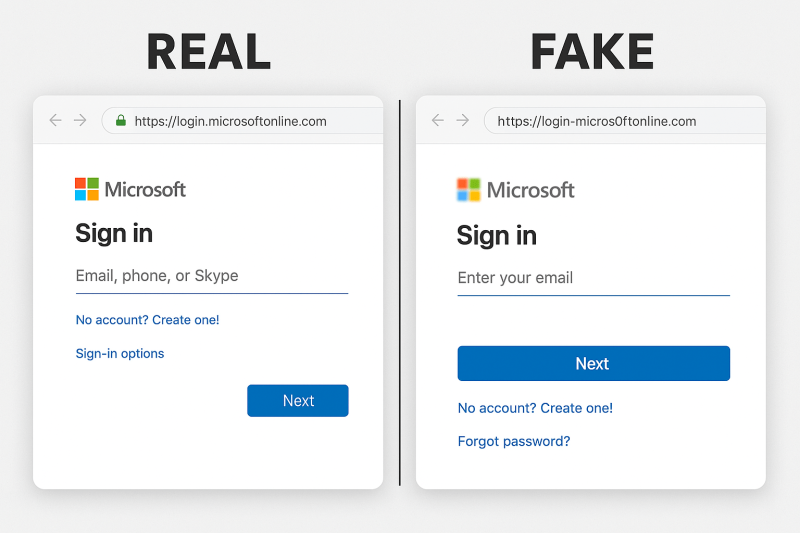
So I compared it with the real Microsoft sign-in page.
Side by side, they were almost identical.
The attackers had copied:
- The Microsoft logo.
- The colours.
- The fonts.
- The layout.
- The sign-in buttons.
- Even the copyright notice at the bottom of the page.
To an ordinary user, there was almost no visible difference.
The Only Real Difference Was the Web Address
The page itself looked genuine.
The browser address didn’t.
Instead of Microsoft’s official domain, the criminals had registered a very similar-looking website.
It contained:
- The word “Microsoft.”
- Extra words.
- Additional letters and numbers.
- A different domain.
At a quick glance, most people would never notice.
That’s exactly why phishing websites continue to succeed.
The Email Created a Sense of Urgency
Looking back, the attackers weren’t relying only on the fake website.
They were also using psychology.
The email warned:
“Your password expires today.”
“Immediate action is required.”
“Failure to update may result in account suspension.”
Those messages were designed to create pressure.
When people believe they might lose access to work files or email, they often act before thinking carefully.
The Fake Login Page Worked Like a Trap
The page wasn’t trying to hack my computer.
It wasn’t exploiting a software vulnerability.
Instead, it waited for me to type my username and password voluntarily.
If I had entered my password, the website could have recorded it immediately.
Some phishing websites even redirect victims to the genuine Microsoft website afterwards.
The victim signs in successfully on the second attempt and assumes they simply mistyped their password the first time.
Meanwhile, the criminals already have the original password.
Then I Examined the Email More Carefully
I returned to the original email.
This time I looked beyond the design.
I checked the sender’s email address.
At first glance, it appeared official.
But after reading it carefully, I noticed it wasn’t actually sent from Microsoft.
The display name looked trustworthy.
The underlying email address told a different story.
That small detail exposed the deception.
Why Microsoft Is Frequently Impersonated
The more I researched, the more I understood why criminals often copy Microsoft login pages.
Millions of people use Microsoft services every day.
Including:
- Outlook.
- Microsoft 365.
- OneDrive.
- Teams.
- SharePoint.
Because people recognise the Microsoft brand, they’re more likely to trust emails that appear to come from it.
The attackers aren’t exploiting Microsoft itself.
They’re exploiting the trust people place in the brand.
One Small Habit Saved My Account
Looking back, I realised I was only seconds away from typing my password.
One habit stopped me.
I looked at the browser address before entering my credentials.
That single decision prevented my account from being compromised.
Sometimes cybersecurity isn’t about recognising complicated attacks.
It’s about paying attention to one small detail before clicking Sign In.
In the final part of this article, I’ll explain the biggest warning signs of Microsoft phishing pages, share practical ways to protect your Microsoft accounts, and reveal the simple rule I now follow before entering my password on any website.
Continue Reading: The Fake Microsoft Office Login Page (Part 3)



