Automating the VAPT Lifecycle: Integrating Claude AI with Local Security Toolkits
July 11, 2026
Com 0
By Jackson Godwin & Penetration Tester.
This guide explains how to integrate MCP (Model Context Protocol) with Claude using Kali Linux.
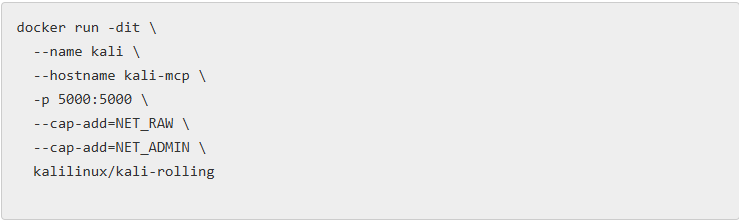
1. Install Docker and Run Kali Container
First, install Docker and start a Kali Linux container.
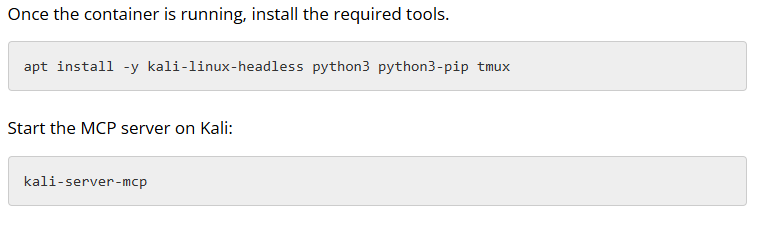
2. Install Required Packages in Kali
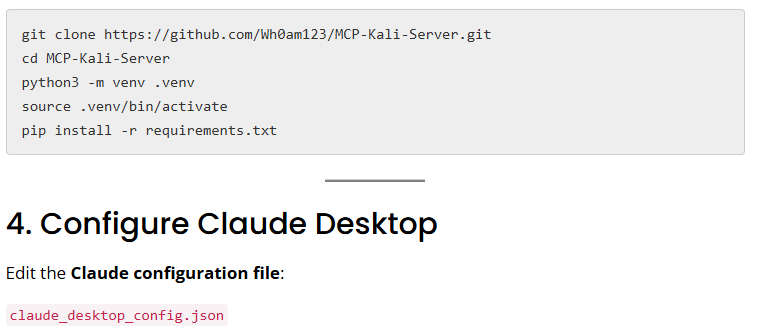
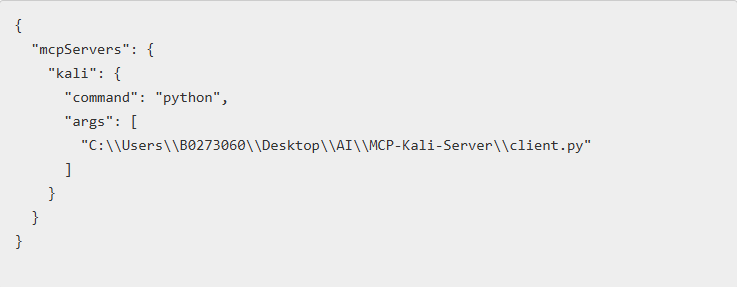
3. Install MCP Client on Windows
Clone the MCP Kali Server repository and set up the Python environment.
This configuration connects Claude Desktop to the MCP Kali Server client, enabling Claude to interact with Kali tools.
✅ After completing these steps, Claude can execute security tools in Kali via MCP.
Jackson Godwin is a Cybersecurity Consultant specializing in Vulnerability Assessment and Penetration Testing (VAPT), Governance, Risk and Compliance (GRC), Information Security, and Enterprise Security Assessments. Through JacksonTechnology.com.ng, he shares practical cybersecurity tutorials, compliance guides, and career advice to help aspiring professionals and organizations strengthen their cybersecurity capabilities.