By Jackson Godwin. Cybersecurity Analyst & Pentration Tester.

How Fake ChatGPT Apps Steal Your Login
Most fake AI applications don’t need advanced hacking techniques.
Instead, they rely on phishing.
Here’s how the attack typically works:
- The victim downloads a fake ChatGPT application.
- The application displays a convincing login page.
- The victim enters their email and password.
- Instead of sending the credentials to OpenAI’s servers, the app sends them directly to the attackers.
- The attackers immediately try to access the victim’s account.
Some fake apps even display a fake error message after stealing your credentials to make you believe the login simply failed.
Meanwhile, your username and password may already be in criminal hands.
Where Do Fake AI Apps Come From?
Cybercriminals distribute fake AI applications through many channels, including:
- Fake software download websites
- Unofficial Android APK sites
- Fake app stores
- Social media advertisements
- Sponsored search results
- Messaging apps
- Email phishing campaigns
- Online forums
Some criminals even purchase advertisements so their fake websites appear above legitimate search results.
That’s why you should never assume the first search result is automatically trustworthy.
Warning Signs of a Fake ChatGPT App
Although many fake apps look convincing, several warning signs can help you identify them.
1. Unofficial Download Source
The safest place to access ChatGPT is through the official OpenAI website or official app stores.
If you’re downloading from an unfamiliar website, proceed with caution.
2. Requests for Unnecessary Permissions
A chatbot doesn’t normally need access to:
- Your contacts
- SMS messages
- Phone calls
- Device administrator privileges
- Accessibility controls
If an AI app requests excessive permissions, that’s a major red flag.
3. Poor Grammar or Spelling
Many phishing websites contain:
- Awkward wording
- Spelling mistakes
- Broken English
- Low-quality graphics
Professional software companies usually maintain polished websites and applications.
4. Too-Good-To-Be-True Promises
Some fake AI apps advertise:
- Unlimited GPT-5 access for free
- Premium subscriptions without payment
- Unlimited image generation
- Lifetime access
Offers that seem unrealistic are often scams.
What Criminals Do with Stolen Accounts
Once attackers obtain login credentials, they may:
- Access your conversations.
- Attempt to reset passwords for other accounts.
- Reuse your password on other websites.
- Sell your account on underground marketplaces.
- Send phishing messages using your identity.
- Harvest personal information from your account.
If you reuse passwords across multiple websites, one stolen password could expose many of your online accounts.
I Realized My Mistake
After investigating what happened, I compared the fake application with the genuine ChatGPT website.
The differences were obvious—but only after I knew what to look for.
The fake website:
- Used a slightly different web address.
- Had no clear company information.
- Displayed fake customer reviews.
- Contained several spelling mistakes.
- Asked for my login immediately.
The official service looked far more professional.
Unfortunately, by then I had already entered my credentials.
Fortunately, I changed my password before the attackers fully gained control.
Why AI Scams Are Increasing
Artificial intelligence has become one of the most recognizable technologies in the world.
Cybercriminals know millions of people search for:
- ChatGPT
- AI writing tools
- AI assistants
- Image generators
- Coding assistants
Wherever there is popularity, scammers follow.
Today, criminals create fake versions of well-known brands because people naturally trust familiar names.
That makes AI-related scams especially effective.
Coming Up in Part 3
In the final part, you’ll learn:
- How to verify you’re using the official ChatGPT app
- What to do if you’ve entered your credentials into a fake app
- Best practices for protecting your AI accounts
- Cybersecurity lessons from this experience
- Frequently Asked Questions
- Final Thoughts
- About the Author
The Fake ChatGPT App That Stole My Login: How a Fake AI App Nearly Hijacked My Account (Part 3)
In Part 2, we explored how fake ChatGPT applications steal login credentials and why cybercriminals are increasingly targeting users of popular AI platforms.
In this final section, you’ll learn how to verify you’re using the official ChatGPT app, what to do if you’ve entered your credentials into a fake application, and how to protect yourself from similar scams in the future.
How to Verify You’re Using the Official ChatGPT App
Before downloading any AI application, take a few minutes to verify that it’s genuine.
Here are some simple checks:
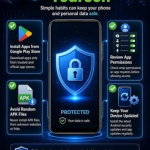
1. Download from Official Sources
The safest places to access ChatGPT are:
- The official OpenAI website
- The official Apple App Store
- The official Google Play Store
Avoid downloading ChatGPT from:
- Third-party APK websites
- Unofficial software download portals
- Links shared in random social media posts
- Pop-up advertisements
- Unknown email attachments
2. Check the Developer
Always verify the developer’s name before installing an app.
Cybercriminals often use names that look similar to legitimate companies in an attempt to confuse users.
A quick check can prevent a costly mistake.
3. Review Permissions
A chatbot application should not require unnecessary access to:
- Your contacts
- SMS messages
- Call history
- Device administrator controls
- Accessibility services
If an AI app requests permissions unrelated to its purpose, treat it as suspicious.
4. Keep Multi-Factor Authentication (MFA) Enabled
One reason I avoided losing complete access to my account was that I had additional security measures enabled.
Whenever possible, activate Multi-Factor Authentication on:
- Your email account
- AI platforms
- Cloud storage
- Banking services
- Social media accounts
Even if your password is stolen, MFA makes it much harder for attackers to gain access.
What To Do If You Entered Your Password into a Fake ChatGPT App
If you believe you’ve used a fake AI application, act immediately.
Change Your Password
Reset your password as soon as possible.
If you reuse that password elsewhere, change it on those accounts too.
Review Account Activity
Check your account for:
- Unknown login locations
- New devices
- Security alerts
- Changed recovery information
- Unrecognized activity
If anything looks suspicious, sign out of all devices and secure your account.
Scan Your Device
Run a complete malware scan using trusted security software.
Some fake AI apps steal passwords.
Others install additional malware that remains active even after you uninstall the application.
Remove Suspicious Applications
Delete any application you don’t recognize.
If you downloaded software from an unofficial website, uninstall it immediately.
Monitor Your Email
Most online accounts rely on email for password recovery.
Watch for:
- Password reset requests
- Login alerts
- Security notifications
- Messages you didn’t initiate
Respond quickly to any suspicious activity.
Lessons I Learned
This experience taught me several valuable cybersecurity lessons.
Never trust software simply because it looks professional.
Always verify the source before entering your credentials.
Cybercriminals don’t always rely on sophisticated hacking tools.
Sometimes they simply wait for users to hand over their usernames and passwords.
That realization completely changed the way I download software.
Now I always:
- Verify websites carefully.
- Download applications only from official sources.
- Check developer information.
- Read independent reviews.
- Enable Multi-Factor Authentication.
- Keep my devices updated.
Those simple habits dramatically reduce the risk of becoming a victim.
Frequently Asked Questions
Are there fake ChatGPT apps?
Yes.
Cybercriminals regularly create fake AI applications that imitate legitimate software to steal login credentials or install malware.
Can a fake ChatGPT app steal passwords?
Yes.
Many fake AI apps use phishing login pages that capture usernames and passwords before sending them directly to attackers.
Others may install malware capable of stealing saved browser credentials.
How can I tell if an AI app is legitimate?
Verify:
- The download source.
- The developer’s identity.
- User reviews.
- Requested permissions.
- The website address.
If anything appears unusual, avoid installing the application.
Is ChatGPT itself dangerous?
No.
The official ChatGPT service is a legitimate AI platform.
The danger comes from fake applications and phishing websites pretending to be ChatGPT.
Should I reuse the same password for AI accounts?
No.
Every online account should have a unique, strong password.
Using different passwords prevents attackers from accessing multiple accounts if one password is compromised.
Final Thoughts
Artificial intelligence is transforming the way we work, learn, and communicate. Unfortunately, cybercriminals are exploiting that popularity by creating fake AI applications designed to steal passwords, personal information, and even financial data.
The safest approach is simple:
Only download software from trusted, official sources.
Always verify the developer before installing an application.
Be cautious of websites that pressure you to log in immediately or promise unrealistic premium features for free.
Cybersecurity isn’t just about technology—it’s about making smart decisions every day.
One careful click can protect your identity.
One careless download can put your entire digital life at risk.
Stay informed, stay alert, and always think before you install.
About the Author
Jackson Godwin is a Cybersecurity Consultant and Vulnerability Assessment & Penetration Testing (VAPT) Specialist with over five years of professional experience in offensive security, Governance, Risk & Compliance (GRC), cloud security, AI security, ISO/IEC 27001, and PCI DSS.
He has conducted vulnerability assessments, penetration testing engagements, security audits, and compliance projects for organizations across multiple industries, helping businesses strengthen their cybersecurity posture and defend against evolving digital threats.
Jackson is the founder of JacksonTechnology.com.ng, where he publishes practical cybersecurity guides, ethical hacking tutorials, cybersecurity certification roadmaps, cyber awareness stories, cloud security insights, and online safety tips. His goal is to make cybersecurity knowledge practical, accessible, and easy to understand for students, IT professionals, businesses, and everyday internet users.
Areas of Expertise
- Vulnerability Assessment & Penetration Testing (VAPT)
- Web Application Security
- Network Security
- Cloud Security
- Governance, Risk & Compliance (GRC)
- ISO/IEC 27001
- PCI DSS
- AI Security
- Cybersecurity Awareness
- Security Consulting
Visit JacksonTechnology.com.ng for expert cybersecurity articles, career guides, ethical hacking tutorials, real-world cyber awareness stories, and practical advice to help you stay safe in today’s digital world.