How to Detect a Cyber Attack Before It Happens — SIEM Explained
May 27, 2026
Com 0
By Jackson Godwin | TechTrain Academy | Cybersecurity Governance & VAPT Specialist Category: Security Operations
Most cyber-attacks do not happen in an instant. They unfold over hours, days, and sometimes weeks — with attackers carefully moving through systems, escalating privileges, and positioning themselves before delivering their final blow. And throughout this entire process, they leave traces.
The tragedy for most Nigerian organizations is that those traces exist in their logs — but nobody is watching.
Early detection is the single most powerful weapon in your cybersecurity arsenal. Organizations that detect attacks early contain the damage. Organizations that detect attacks late — or not at all — often suffer catastrophic consequences.
In this article, I will show you the 10 most common warning signs that a cyber attack is underway in your organization, and how to set up the monitoring systems that will help you spot them before it is too late.
The Detection Gap in Nigeria Research consistently shows that the average time between a breach occurring and an organization detecting it is measured in months, not days. For Nigerian organizations without proper monitoring in place, breaches often go undetected until a customer reports suspicious transactions, a regulator flags unusual activity, or the attacker makes their move, and the damage becomes visible. Every day of undetected intrusion is another day of data theft, credential harvesting, and attacker entrenchment.
10 Warning Signs Your Organization May Be Under Attack
What it means: Multiple failed login attempts followed by a successful login, especially outside normal working hours or from unusual geographic locations, is one of the clearest early warning signs of a credential-based attack. Attackers who have obtained stolen credentials will test them, and their login patterns look very different from those of legitimate users. What to do: Configure your SIEM to alert on multiple failed login attempts followed by success. Monitor for logins from unusual locations or at unusual hours. Implement account lockout policies after a defined number of failed attempts. Require MFA for all sensitive system access.
WARNING SIGN #2 — Unexpected Large Data Transfers | CRITICAL
What it means: When an attacker has successfully compromised a system and is ready to exfiltrate data, they will typically transfer large volumes of data to external locations. Unusually large outbound data transfers — especially to destinations outside Nigeria or to cloud storage services not normally used by your organization — are a major red flag. What to do: Set up baseline monitoring of normal outbound data transfer volumes. Configure alerts for transfers that significantly exceed normal patterns. Monitor for transfers to unusual external destinations. Implement Data Loss Prevention (DLP) solutions to automatically block unauthorized large transfers.
WARNING SIGN #3 — Accounts Accessing Systems They Never Use | HIGH
What it means: When an attacker compromises a user account, they typically begin exploring systems that the legitimate user would never normally access. An accounts payable clerk suddenly accessing server administration tools, or an HR account querying the customer database, are examples of anomalous access patterns that indicate account compromise. What to do: Implement User and Entity Behavior Analytics (UEBA) to establish baselines of normal behavior for each account. Configure alerts for access to systems outside normal patterns. Regularly review access logs for unusual account activity. Implement least-privilege access to limit what a compromised account can reach.
WARNING SIGN #4 — Unexpected New User Accounts or Privilege Escalation | CRITICAL
What it means: Attackers who have gained initial access will often create new administrator accounts or escalate the privileges of existing accounts to ensure persistent access even if their initial entry point is discovered and closed. Unexpected new accounts or sudden changes in account privileges are a serious warning sign. What to do: Monitor all account creation and privilege change events in real time. Alert immediately on any new administrator account creation or privilege escalation that was not processed through your change management system. Conduct regular access rights reviews and remove accounts that should not exist.
WARNING SIGN #5 — Unusual Outbound Network Traffic | HIGH
What it means: Many types of malware communicate with attacker-controlled servers — sending stolen data, receiving commands, or downloading additional malicious tools. This command-and-control traffic often appears as unusual outbound connections to unfamiliar IP addresses or domains, particularly on unusual ports or at unusual times. What to do: Monitor all outbound network connections and baseline normal traffic patterns. Configure DNS monitoring to detect connections to newly registered or suspicious domains. Use threat intelligence feeds to identify known malicious IP addresses. Deploy a next-generation firewall that can inspect encrypted traffic for command-and-control patterns.
WARNING SIGN #6 — Unexpected System Configuration Changes | HIGH
What it means: Attackers commonly modify system configurations to maintain access, disable security controls, or create backdoors. Unexpected changes to firewall rules, disabled antivirus, modified system files, new scheduled tasks, or changes to startup programs are all signs that an attacker may be manipulating your systems. What to do: Implement File Integrity Monitoring (FIM) — available in Wazuh — to detect any unauthorized changes to system files and configurations. Configure alerts for changes to security tools, firewall rules, and startup configurations. Integrate change management so all legitimate changes are pre-approved and expected.
WARNING SIGN #7 — Spike in System Resource Usage | MEDIUM
What it means: A sudden, unexplained spike in CPU, memory, or network usage — particularly on servers that are not normally heavily loaded — can indicate malicious activity. Cryptominers, ransomware encrypting files, or data exfiltration tools all consume significant system resources. Staff reporting that systems are ‘running slowly’ without explanation should trigger investigation. What to do: Monitor system resource usage across all servers and endpoints. Set up alerts for significant deviations from baseline CPU, memory, and network utilization. Investigate any resource spikes that cannot be explained by legitimate business activity. Use endpoint detection tools to identify processes consuming unusual resources.
What it means: One of the first things sophisticated attackers do after gaining access is attempt to disable or modify security tools — antivirus, logging agents, SIEM sensors, or endpoint detection systems. If your security monitoring suddenly stops receiving data from an endpoint, or if antivirus reports being disabled, this is a serious warning sign. What to do: Configure your SIEM to alert immediately when any monitored endpoint stops sending logs. Monitor the operational status of all security tools. Implement tamper protection on endpoint security solutions. Create a process that requires immediate investigation of any security tool reporting as disabled or modified.
WARNING SIGN #9 — Unusual DNS Queries | HIGH
What it means: Domain Name System (DNS) queries are often overlooked as a source of threat intelligence, but they reveal a great deal about what systems are communicating with. Queries to newly registered domains, domains with unusual patterns, or domains flagged in threat intelligence feeds can indicate malware communication, data exfiltration through DNS tunneling, or phishing infrastructure. What to do: Enable DNS logging across your network. Integrate DNS logs into your SIEM for analysis. Use threat intelligence feeds to flag queries to known malicious domains. Monitor for DNS tunneling patterns — unusually high volumes of DNS queries or unusually large DNS responses that may indicate data exfiltration.
WARNING SIGN #10 — Staff Reporting Unusual System Behavior | HIGH
What it means: Sometimes the first alert comes from your own staff — a computer that suddenly rebooted without explanation, files that have been renamed or encrypted, browser redirecting to unfamiliar websites, or unexpected pop-ups. These human observations are often the earliest available warning of an active attack, and they should be taken seriously and investigated immediately. What to do: Create a simple, easy-to-use process for staff to report suspicious system behavior without fear of judgment. Train all staff to recognize and report warning signs. Treat every report seriously and investigate promptly. A culture where staff feel comfortable reporting concerns is a critical early warning system that no technology can replace.
How SIEM Helps You Detect These Warning Signs Automatically
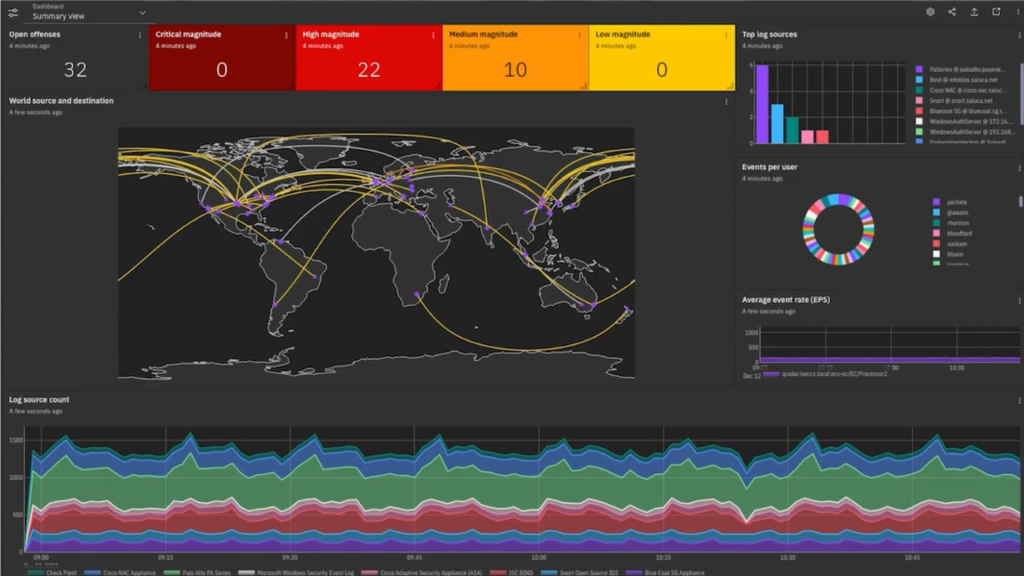
Manually monitoring for all these warning signs across a Nigerian organization with dozens or hundreds of systems is practically impossible without the right tools. This is exactly where a Security Information and Event Management (SIEM) system becomes essential.
A properly configured SIEM — such as Wazuh — automatically:
Collects logs from all systems, devices, and applications across your environment
Correlates events across multiple sources to identify attack patterns that no single log would reveal
Applies detection rules to identify the warning signs described above in real time
Generates prioritized alerts so your security team focuses on the most critical threats first
Maintains a complete audit trail of all security events for forensic investigation
Produces compliance reports demonstrating your monitoring capability to regulators
The SIEM Advantage Without a SIEM, detecting these warning signs requires manually reviewing logs from dozens of different systems — a task that is practically impossible for most Nigerian security teams. With a properly configured SIEM, these detections happen automatically, 24 hours a day, 7 days a week, generating alerts the moment suspicious patterns emerge.
Building Your Early Detection Capability — Where to Start
If your organization does not yet have a systematic approach to threat detection, here is how to start:
Step 1 — Inventory: Identify all systems, devices, and applications that generate logs in your organization
Step 2 — Centralize: Deploy a SIEM (Wazuh is recommended for Nigerian organizations) to collect logs from all sources
Step 3 — Baseline: Establish what normal activity looks like across your environment so anomalies stand out
Step 4 — Alert: Configure detection rules for the warning signs described in this article
Step 5 — Respond: Create incident response procedures for each type of alert so your team knows exactly what to do
Step 6 — Train: Ensure your security team can interpret SIEM alerts and conduct initial investigations
Step 7 — Improve: Regularly review and tune your detection rules to reduce false positives and catch new attack techniques
Conclusion
The gap between organizations that detect attacks early and those that discover breaches months later is not intelligence or luck — it is preparation and monitoring. Every Nigerian organization that handles sensitive data, processes financial transactions, or operates critical systems owes it to its customers and stakeholders to invest in early detection capability.
The warning signs described in this article are happening in Nigerian organizations right now. The question is whether anyone is watching for them.
With the right SIEM implementation and properly trained security team, you can be one of the organizations that catches attacks early — and stops them before they become catastrophes.
Get Professional SIEM Monitoring for Your Organization TechTrain Academy provides Wazuh SIEM deployment, configuration, and 24/7 monitoring services for Nigerian organizations. We also train your security team to become effective threat hunters using industry-leading SIEM tools. Book a SIEM Consultation | Enroll in Threat Detection Training
About the Author Jackson Godwin is a Cybersecurity Governance & VAPT Specialist and founder of TechTrain Academy. With over 5 years of experience delivering cybersecurity projects across Nigerian banking, government, fintech, and oil & gas sectors, Jackson specializes in security operations, SIEM deployment, and threat detection. He has trained over 200 cybersecurity professionals across Nigeria, Ghana, and Gambia.