By Jackson Godwin. Cybersecurity Analyst & Penetration Tester.
A Simple Meal Could Have Become a Serious Cyber Incident
As I left the restaurant that evening, I kept thinking about how easily the scam could have succeeded.
I hadn’t received a suspicious email.
Nobody had called pretending to be my bank.
There were no obvious warning signs.
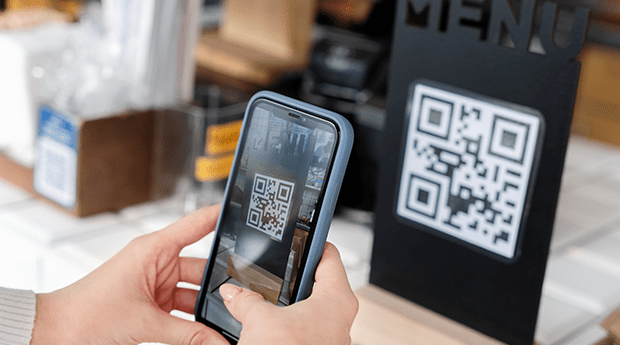
All I did was scan a QR code sitting on a restaurant table.
If I had entered my login credentials into the fake website, I might have handed them directly to cybercriminals.
Sometimes the most dangerous attacks don’t arrive in your inbox.
They’re already waiting where you least expect them.
The Biggest Warning Signs I Almost Missed
Looking back, several clues exposed the scam.
Here are the biggest lessons I learned.
🚩 A Restaurant Menu Shouldn’t Require a Login
This was the first major warning sign.
I only wanted to view a menu.
There was no obvious reason to sign in with my:
- Google account
- Apple account
- Facebook account
If a simple service suddenly asks for account credentials, ask yourself why.
The request may not be legitimate.
🚩 The QR Code Had Been Covered
The criminals didn’t replace the restaurant’s menu.
They simply placed a fake QR code sticker over the genuine one.
Unless someone looked carefully, the difference was almost impossible to spot.
Before scanning a QR code in a public place, take a quick look to see whether it appears to have been tampered with or covered by another sticker.
🚩 The Website Didn’t Match the Situation
The website asked me to verify my device before viewing food.
That didn’t make sense.
Whenever a website requests unnecessary information for a simple task, treat it as a warning sign.
The amount of information requested should match the service being provided.
🚩 I Didn’t Check Where the QR Code Led
Many smartphones now display the destination website before opening it.
If yours does, take a moment to read it.
A few extra seconds could help you spot an unfamiliar or suspicious web address.
🚩 Curiosity Nearly Beat Common Sense
I wanted to see the menu.
That simple curiosity almost caused me to ignore several warning signs.
Criminals understand human behaviour.
They know curiosity often makes people act before they think.
How to Protect Yourself From Fake QR Code Scams
Since that experience, I’ve changed how I use QR codes.
Check the QR Code First
Before scanning:
- Look for stickers placed over existing QR codes.
- Check whether the code appears damaged or altered.
- If something looks unusual, ask a member of staff before scanning.
Look at the Website Address
If your phone previews the destination before opening it:
Read it.
If the address doesn’t match the organisation you’re expecting, don’t continue.
Avoid Entering Passwords Unnecessarily
If a QR code meant to display:
- A menu
- A timetable
- Basic information
- A brochure
suddenly asks you to log into personal accounts, stop and question why.
Ask Staff If You’re Unsure
In restaurants, cafés or hotels, employees can often confirm whether a QR code is genuine.
If something feels unusual, asking a simple question may protect both you and other customers.
Keep Your Phone Updated
Install updates for:
- Your operating system
- Your web browser
- Security software, if you use one
Software updates often improve protection against known threats.
Frequently Asked Questions
Are QR codes themselves dangerous?
No.
QR codes are simply another way of storing information such as website addresses, contact details or payment information.
The danger comes from where the QR code sends you, not the QR code itself.
Can criminals really replace QR codes?
Yes.
In public places, attackers have been known to place fake QR code stickers over legitimate ones.
That’s why it’s worth taking a quick look before scanning.
Should I avoid scanning QR codes completely?
No.
QR codes are widely used by legitimate businesses.
Instead of avoiding them entirely, use them carefully.
Verify the destination before entering personal or financial information.
What should I do if I entered my details on a suspicious website?
If you believe you’ve entered passwords or other sensitive information into a fraudulent website:
- Change your passwords immediately from a trusted device.
- Enable two-factor authentication where available.
- Contact affected service providers if financial information may have been exposed.
- Monitor your accounts for unusual activity.
Acting quickly can reduce the risk of further harm.
Final Thoughts
The fake QR code wasn’t sophisticated.
It wasn’t hidden deep inside a computer system.
It was a small sticker placed on top of another sticker.
Yet that simple trick could have captured usernames, passwords or other personal information from unsuspecting customers.
Fortunately, one habit protected me.
I paused before entering my login details.
Today, every time I scan a QR code, I follow one simple rule:
Scan the code. Verify the destination. Trust nothing until it makes sense.
Those few extra seconds could protect your accounts, your personal information and your peace of mind.
In cybersecurity, even the smallest pause can prevent the biggest mistakes.
About the Author
Jackson Godwin is a Cybersecurity Consultant specialising in Vulnerability Assessment and Penetration Testing (VAPT), Governance, Risk and Compliance (GRC), ISO/IEC 27001, PCI DSS, Cloud Security, AI Security, and Digital Risk Management.
With years of experience helping organisations identify vulnerabilities, strengthen security controls, and improve cyber resilience, Jackson is passionate about making cybersecurity practical, easy to understand, and accessible to everyone.
Through JacksonTechnology.com.ng, he publishes cybersecurity awareness stories, ethical hacking tutorials, compliance guides, cloud security insights, AI security resources, and practical online safety tips to help individuals and businesses stay protected against evolving cyber threats.
His mission is to educate, empower, and inspire safer digital habits—one cybersecurity story at a time.